
`.agents` vs `.claude`: Where Should AI Agent Skills Actually Live?
Source article: Apiyi.com Blog
AI agent projects now accumulate configuration surfaces fast: .claude/, .agents/, .cursor/, AGENTS.md, CLAUDE.md, and more. The practical question is simple: when you build reusable skills for agent workflows, where should they live?
The short answer is that .claude/ and .agents/ are not competing folders. They represent different layers of the agent tooling stack. One is a mature Claude Code implementation. The other is an emerging cross-tool standard.
This guide breaks down the five differences that actually matter in day-to-day development, shows how the directory structures diverge, and gives a workable rule for teams that use multiple coding agents.
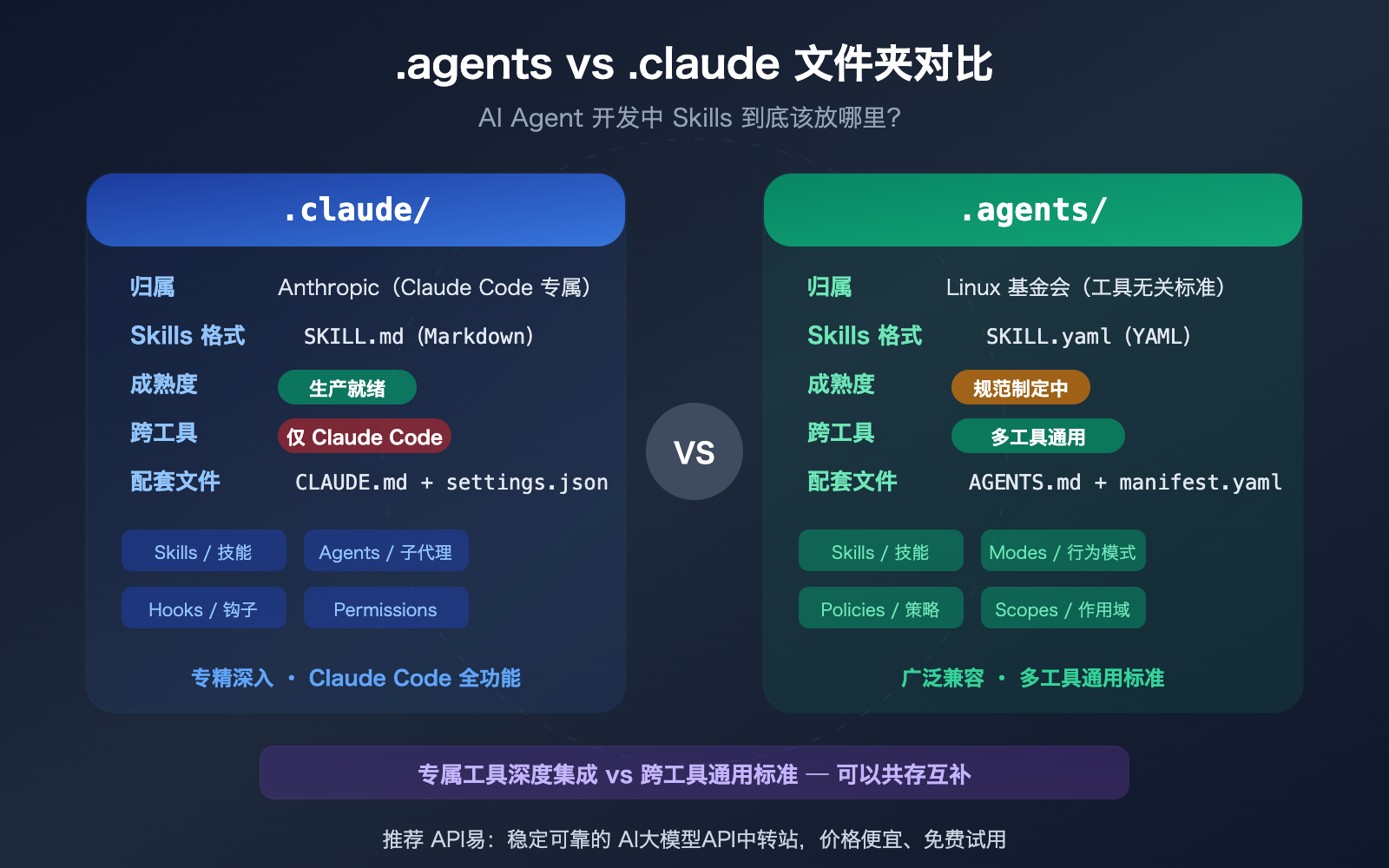
The one-line distinction
- Use
.claude/for Claude Code specific capabilities that rely on Anthropic's native conventions. - Use
.agents/for portable agent configuration you want to share across tools and teams.
If your team only uses Claude Code, you can put most of your operational skill work in .claude/ today. If your team mixes Claude Code, Codex, Cursor, Copilot, or other agentic tooling, you need to think in layers and separate tool-specific setup from portable project context.
1. Ownership and ecosystem
The first difference is who each system is for.
.claude/ belongs to the Claude Code ecosystem. It is designed around Anthropic's product model and deeply integrates with Claude Code features such as project instructions, personal overrides, skills, sub-agents, hooks, and local permissions.
.agents/ is part of a broader, tool-agnostic push toward shared agent configuration. The goal is similar to what .editorconfig did for editors: define a standard layout that many tools can read consistently.
That difference matters because it changes what you optimize for:
| Dimension | .claude/ | .agents/ |
|---|---|---|
| Primary owner | Claude Code ecosystem | Cross-tool agent standard |
| Main goal | Deep integration | Portability |
| Current maturity | Production-ready | Still evolving |
| Best fit | Claude-first teams | Mixed-tool teams |
2. Skills file format
The second difference is the skill definition format.
In .claude/skills/, skills are typically defined with SKILL.md: Markdown instructions plus YAML frontmatter. That makes them readable, easy to iterate on, and closely aligned with how Claude decides when and how to invoke a skill.
---
name: code-review
description: Review a pull request for correctness, regressions, and missing tests.
user-invocable: true
allowed-tools: Read, Grep
context: fork
model: sonnet
---

Review the provided diff with a production mindset.
In .agents/skills/, the design centers around SKILL.yaml, a more structured YAML-first definition. The tradeoff is clear: SKILL.md is friendlier for human-authored instruction-heavy workflows, while SKILL.yaml is easier for generic tooling and machine validation.
3. Directory structure and capability model
The third difference is how much surrounding infrastructure each folder expects.
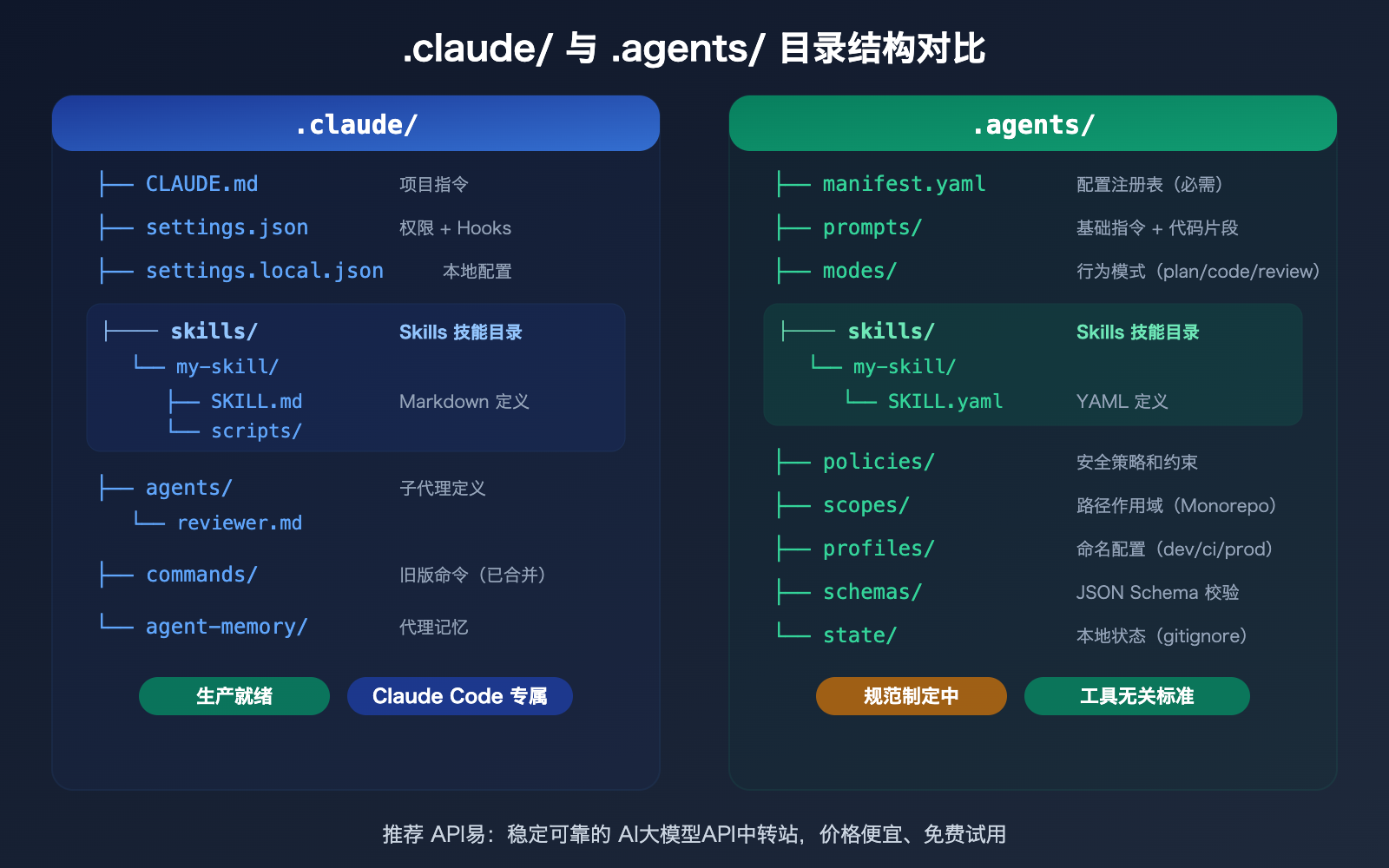
Claude Code's .claude/ directory is comparatively direct. It gives you a home for project instructions, shared settings, local overrides, skills, agents, and memory. It is designed for developer productivity inside a single tool.
.claude/
+-- CLAUDE.md
+-- settings.json
+-- settings.local.json
+-- skills/
+-- agents/
+-- commands/
-- agent-memory/
The .agents/ model is broader. It is closer to a formal configuration spec than a convenience folder.
.agents/
+-- manifest.yaml
+-- prompts/
+-- modes/
+-- policies/
+-- skills/
+-- scopes/
+-- profiles/
+-- schemas/
-- state/
That extra structure is not accidental. It is there to support reusable prompts, explicit policy layers, scope-based overrides for monorepos, named runtime profiles such as dev or ci, and schema validation. In other words, .agents/ aims to standardize the full configuration surface, not just where skills happen to be stored.
4. Runtime behavior and developer ergonomics
The fourth difference is how much runtime behavior each system exposes out of the box.
With .claude/, several high-value behaviors are directly encoded in the skill itself:
user-invocable: truecan register a slash-command style invocation.context: forkcan isolate execution in a separate sub-agent context.allowed-toolscan constrain tool access at the skill level.modelcan override model choice for the task.- Helper folders like
scripts/,references/, andtemplates/are natural companions to the skill.
The .agents/ approach is more indirect. Behavior tends to be expressed through surrounding configuration such as modes/, profiles/, and policies/ rather than inline in one Markdown file. That is more modular, but it also means support depends heavily on the tool that claims to implement the spec.
This is why .claude/ feels more productive today for Claude-native workflows: fewer moving parts, clearer conventions, and less ambiguity around execution.
5. Git strategy, team workflow, and coexistence
The fifth difference is how teams should actually manage these files in a real repository.
The practical split looks like this:
- Commit shared Claude Code project setup such as
CLAUDE.mdand.claude/settings.json. - Keep local-only Claude overrides out of Git, such as
.claude/settings.local.json. - Put project-wide, tool-agnostic guidance into
AGENTS.md. - Use
.agents/for portable skills and general agent configuration only if your team benefits from cross-tool reuse.
This layered model avoids a common mistake: trying to force one folder to do everything.
| Use case | Best location |
|---|---|
| Claude Code specific hooks, permissions, sub-agents | .claude/ |
| Portable project instructions for many agent tools | AGENTS.md |
| Mature Claude-native skills | .claude/skills/ |
| Cross-tool reusable skill definitions | .agents/skills/ |
| Personal experiments and local-only tweaks | local Claude files or ignored config |
So where should your skills go?
If you need a concrete rule, use this one:
Put skills in .claude/skills/ when
- They rely on Claude Code native behavior.
- They use
SKILL.mdconventions like frontmatter, slash commands, or forked context. - Your team is primarily Claude Code based.
- You need the most mature, lowest-friction implementation right now.
Put skills in .agents/skills/ when
- The skill should be portable across multiple agent tools.
- You want a spec-oriented, tool-neutral configuration model.
- You are willing to manage the fact that support is still uneven.
- The team values long-term interoperability more than immediate convenience.
Let both exist when
- The project has a Claude-first workflow but also wants portable project context.
- Shared guidance can live in
AGENTS.md, while Claude-specific execution details stay in.claude/. - Some skills are general purpose, while others are tightly coupled to Claude Code.
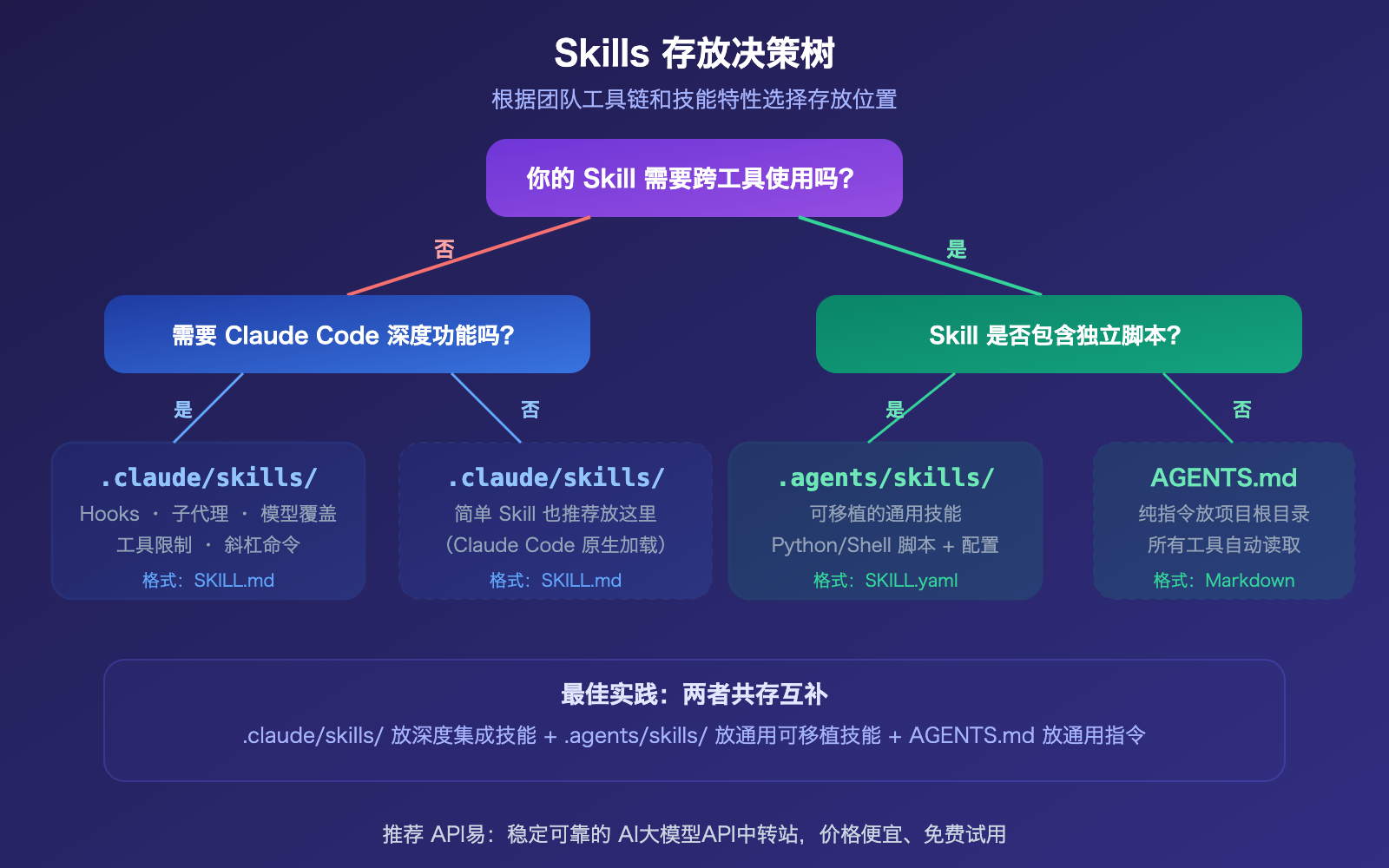
Recommended layout for multi-tool teams
For most serious teams, the best answer is coexistence with clear boundaries:
- Put universal project context in
AGENTS.md. - Put Claude Code-specific instructions in
CLAUDE.mdand.claude/. - Keep Claude-native skills in
.claude/skills/. - Move only genuinely portable skills into
.agents/skills/. - Treat
.agents/as an interoperability layer, not a mandatory replacement for Claude Code's native system.
This gives you immediate productivity without giving up the option of future standardization.
FAQ
Can Claude Code read skills directly from .agents/skills/?
Not natively today. If the skill must work in Claude Code right now, .claude/skills/ remains the safer default.
Is the .agents/ specification ready for all production projects?
Not as a full universal replacement yet. The idea is promising, and related conventions like AGENTS.md already have strong adoption, but tool support still varies.
What should mixed Claude Code and Cursor or Codex teams do?
Use layers. Put shared project knowledge where all tools can consume it, then keep tool-specific behavior in tool-specific folders.
Bottom line
The real choice is not .agents versus .claude. The real choice is whether you are optimizing for deep native integration or cross-tool portability.
.claude/ wins on maturity, ergonomics, and Claude Code feature depth. .agents/ wins on standardization potential and multi-tool reuse. Strong teams do not force one to replace the other. They define a boundary, let each folder do its job, and keep their skills where they are easiest to maintain and safest to execute.
Ready to add skills to your agent?
Browse production-ready APIs with pay-per-call pricing.
Browse Skills